RGBpy-Studio (only for linux)
A downloadable tool for Linux
RGBpy Studio
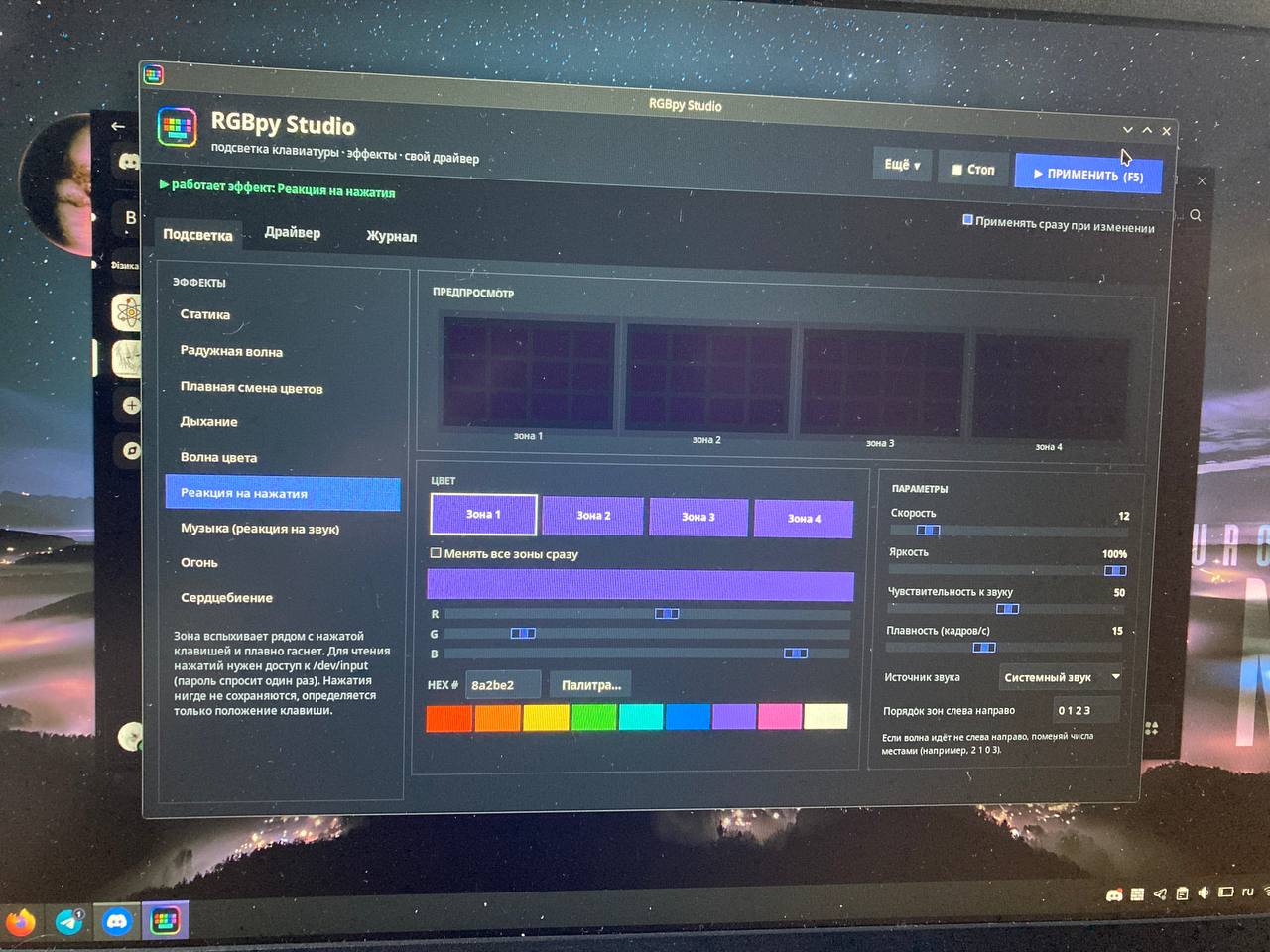
RGBpy Studio is a Linux RGB keyboard and lighting controller with a simple desktop interface, built around a driver-based architecture.
The project is designed to work across different Linux hardware instead of being limited to one laptop or manufacturer. The built-in driver uses common Linux interfaces when available, and custom Python drivers can be created for unsupported hardware.
Features
- Static RGB colors
- Rainbow wave
- Fade
- Breathing effect
- Color wave
- Key reaction effects
- Music/audio-reactive lighting
- Fire effect
- Heartbeat effect
- Per-zone color control
- Zone ordering
- Brightness control
- Effect speed control
- Built-in diagnostics
- Custom Python driver support
- Driver save/load support
- Optional desktop shortcut
- Linux sysfs-based hardware access
- Designed for low-resource systems
Requirements
- Linux
- Python 3
- Tkinter
- RGB hardware supported by the built-in driver or a custom driver
- Root/polkit permissions may be required for some hardware
- Optional audio tools for audio-reactive effects
The application uses standard Python libraries and Tkinter. It does not require a large third-party Python framework.
Installation
Clone the repository:
git clone https://github.com/YOUR_USERNAME/RGBpy-Studio.git cd RGBpy-Studio
Make the launcher executable:
chmod +x RGBpy_Studio.sh
Run it:
./RGBpy_Studio.sh
The launcher checks for Python 3 and Tkinter. If Tkinter is missing, it can attempt to install the required package using the package manager available on the system.
Supported hardware
RGBpy Studio is not intentionally restricted to HP OMEN hardware.
The built-in driver looks for Linux RGB interfaces such as:
/sys/devices/platform/*/rgb_zones
and compatible keyboard LED interfaces under:
/sys/class/leds/
Hardware support depends on the Linux kernel, the hardware driver, firmware, permissions, and the interfaces exposed by the device.
A device that is not supported by the built-in driver may still be supported through a custom driver.
Custom drivers
RGBpy Studio provides a custom Python driver interface.
A driver receives:
apply(zones, brightness)
where:
zonesis a list of RGB colors inrrggbbformatbrightnessis the requested brightness value
A minimal driver can look like this:
def apply(zones, brightness): # Write the requested RGB values to your hardware here. pass
For hardware that exposes one global RGB value, a driver can simply use the first zone.
Example:
def apply(zones, brightness): color = zones[0].lstrip("#") # Write color and brightness to your device here.
Use the application's driver editor to create, save, load, and test a custom driver.
Permissions
Some Linux hardware interfaces are writable only by root or by users with appropriate udev/polkit permissions.
If RGBpy Studio detects the hardware but cannot change its lighting, check:
ls -la /sys/class/leds/
and:
ls -la /sys/devices/platform/
You can also use the built-in diagnostics to inspect detected interfaces and permissions.
Do not blindly change permissions on system devices. Prefer a proper udev rule or polkit configuration when permanent non-root access is required.
Audio-reactive effects
Audio-reactive effects may use tools such as:
parecarecord
Availability depends on the Linux audio stack and installed packages.
If audio effects do not work, run the diagnostics included with RGBpy Studio and check whether an appropriate audio capture tool is available.
Configuration
RGBpy Studio stores its user configuration under:
~/.config/rgbpy_studio/
This keeps user settings separate from the application itself.
Diagnostics
The application includes diagnostics for common Linux RGB problems, including:
- Kernel information
- Linux LED interfaces
- RGB zone interfaces
- Loaded hardware modules
- Secure Boot status
- Audio capture tools
pkexec- Keyboard-related interfaces
Use diagnostics before creating a custom driver whenever possible.
Creating a desktop shortcut
RGBpy Studio can create a desktop shortcut through its built-in interface.
The script also supports installation-related actions through:
./RGBpy_Studio.sh --install
Project structure
RGBpy-Studio/ ├── RGBpy_Studio.sh ├── README.md ├── LICENSE ├── .gitignore ├── CONTRIBUTING.md ├── SECURITY.md └── .github/ └── ISSUE_TEMPLATE/ ├── bug_report.md └── device_support.md
Troubleshooting
The application starts but the keyboard does not change
Run the built-in diagnostics first.
Then check whether your hardware exposes an RGB interface:
find /sys/devices/platform -type d -name rgb_zones 2>/dev/null
You can also inspect keyboard LEDs:
ls /sys/class/leds/
The built-in driver does not support my device
Use the custom driver editor.
Find out which writable Linux interface controls your RGB hardware, then implement the apply(zones, brightness) function for that interface.
The application cannot write to sysfs
This is usually a permissions or kernel-driver issue. Check the file permissions and the module responsible for the hardware.
A feature works on one computer but not another
Linux RGB support is hardware- and driver-dependent. Two computers can expose completely different interfaces even when they have similar RGB hardware.
If your device is not supported, open a device-support issue and include the diagnostic output.
Reporting a problem
Before opening an issue:
- Run the built-in diagnostics.
- Check the existing GitHub issues.
- Include your Linux distribution, kernel version, hardware model, and relevant diagnostic output.
- Do not post passwords, personal data, or private system information.
Contributing
Contributions are welcome.
Useful contributions include:
- New hardware drivers
- Bug fixes
- Linux compatibility improvements
- UI improvements
- Documentation
- Testing on additional hardware
See CONTRIBUTING.md for more information.
License
RGBpy Studio is released under the MIT License. See LICENSE.
Disclaimer
RGBpy Studio interacts with low-level Linux hardware interfaces. Incorrect custom drivers or system permission changes can cause hardware control problems.
Use custom drivers carefully and test them on your own hardware.
The project is provided as-is without a guarantee of compatibility with every Linux device.
Download
Click download now to get access to the following files:
Leave a comment
Log in with itch.io to leave a comment.